Cloud panel & server presets
Link your server to the Formatra Cloud Panel, read live metrics, choose DEFAULT or HUB presets, and set up Discord alerts.
On this page
NusaSpigot connects to your customer Cloud Panel using a secure outbound HTTPS bridge. You never need to open extra firewall ports on Pterodactyl, shared hosting, or home NAT networks.
1. Link your server with /nusa link
- Sign in to your customer Cloud Panel (the portal provided with your NusaSpigot license) and click Add Server to generate a server token.
- Run the link command inside your private server console (never in public chat):
nusa link <YOUR_SERVER_TOKEN>
nusa link status- Once linked, your server saves the bridge token inside
nusa-cloud-bridge.propertiesand sends lightweight telemetry heartbeats every 10 seconds. - Any preset or configuration change queued from the Cloud Panel is dispatched safely onto the single main server thread and backed up before writing
nusa-global.yml. Remember to restart your server after saving startup configuration changes.
To disconnect a server at any time and erase its saved bridge token, run:
nusa link off2. How to read live dashboard metrics
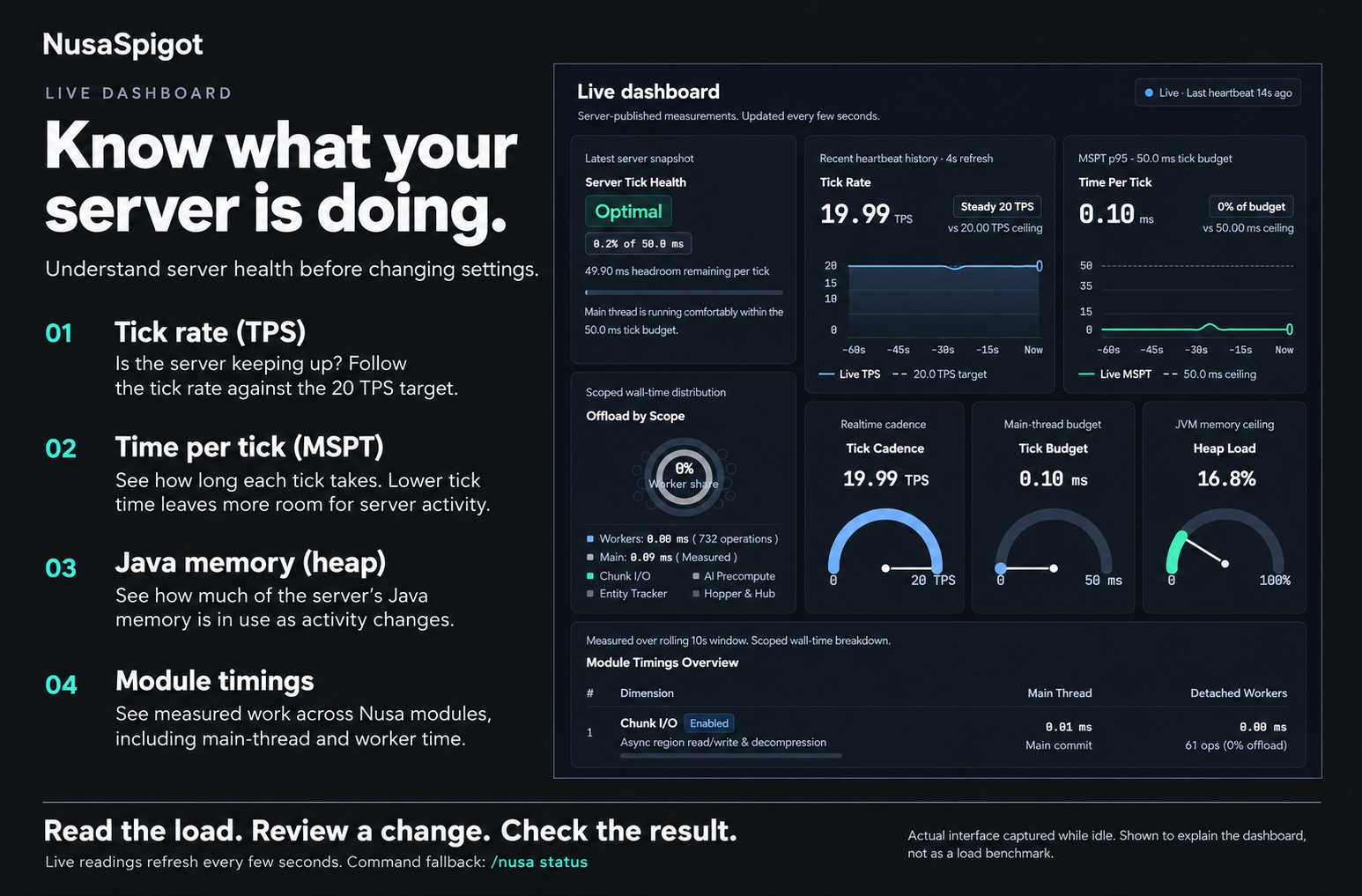
- Tick Rate (TPS): Target is
20.00 TPS. Brief dips during heavy world edits are normal; sustained drops below18 TPSmean the main thread is overloaded. - Time Per Tick (MSPT): Measures how many milliseconds each tick actually takes out of the
50.0 msceiling. For example,12 msMSPT means your server still has38 msof free headroom per tick. - Heap Load: Percentage of allocated
-Xmxmemory currently used. - Module Timings: Shows how much work Chunk I/O, AI Precompute, Entity Tracker, and Hub modules offload to worker threads versus main-thread commit time.
3. Choosing DEFAULT vs HUB preset
NusaSpigot includes a one-line workload preset in nusa-global.yml:
| Preset | Best for | What it does |
|---|---|---|
DEFAULT | Survival SMP, Skyblock, Factions, Practice PvP, Cross-play | Keeps all normal gameplay mechanics active and follows your individual entity-behavior.* settings. |
HUB | Static Auth / Lobby / Waiting rooms | Automatically forces entity-collision, mob-spawning, chunk-ticking, weather-ticking, and villager-ticking off in memory for maximum player capacity. |
Never enable
tuning-preset: HUBon a Survival world—farms, crops, redstone ticks, and villagers are intentionally paused inHUBmode.
4. Optional Discord health alerts
Want automatic notifications in a private staff channel if TPS stays low or someone spams exploit packets? Enable discord-webhook in nusa-global.yml:
feature-flags:
  discord-webhook: true

management:
  discord:
    low-tps-threshold: 15.0
    low-tps-duration-seconds: 60
    cooldown-seconds: 300
Then paste your official Discord HTTPS webhook URL inside management.discord.webhook-url in nusa-global.yml and restart. Keep your webhook URL secret so outsiders cannot post fake messages to your channel.